Scripting
Entities run scripts. arxedit supports the game's own ASL scripts and, on the extended target, Lua classes and components.
ASL
| Where | What |
|---|---|
| Inspector, ASL Init Values | Per-entity values, saved as override lines (see Entities) |
| Script panel | The entity's own instance script: Create a script or Edit a copy of the game's |
| Assets, right-click a class > Override the script | A copy of the class's script in the project, which replaces the game's |
- Instance scripts are saved in the level folder (
scripts/<id>.asl). - Ignore its scripts at Play (Inspector) loads that entity without scripts, when the Play option Ignore marked scripts is on. Handy to skip an intro.
Lua classes
A class is a Lua class when the project has a .lua file for it: assets/<class path>.lua, next to where its .asl would be. The Lua script then runs instead of the ASL one.
- Convert to Lua: right-click a class in Assets. It writes the class's ASL as Lua; the Console lists anything it could not convert exactly.
- Or write the file yourself.
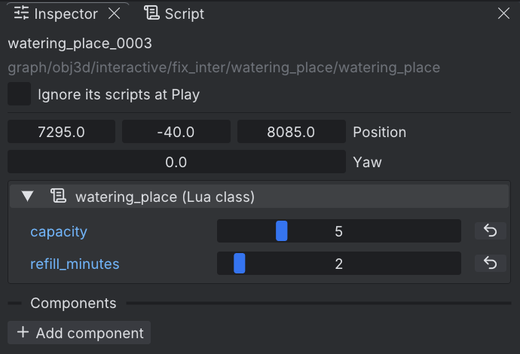
A class declares its properties, which the Inspector shows for every entity of the class:
---@class Lever: Script
local Lever = script {
  props = {
    gate = Entity,                      -- picked in the Inspector
    delay = Number { min = 0, max = 10 }, -- a slider
    once = true,                        -- a plain default: a checkbox
  },
}

function Lever:on_init()
end

return Lever
| Declaration | Inspector field |
|---|---|
Entity |
An entity of the level, chosen from a list or picked in the Scene view |
Integer, Number |
A number box; with { min, max } a slider |
Text |
A text box |
true, 5, "text" |
A field of that value's type |
List(T) |
A list with + Add |
A name table (Assets.sfx, Anim, Spells, enum { "slow", "fast" }) |
A choice |
A value changed from the default shows in blue, with an arrow to revert it.
Lua components
A component is a small script you add to any entity, of a Lua or an ASL class.
- Assets > New > Script..., give it a name (lowercase, digits,
_). - It is made in
assets/scripts/and opens in your script editor. - Select an entity, Add component in the Inspector, and set its properties.
Components get the entity's events after its instance script and before its class.
The mod script
Level > Mod sets the project's mod version and the mods it requires. Create mod.lua makes the mod's own script, which runs when the game starts: extend() gives every entity of a class a component, override() wraps a class's handler.
Script editor
Pick one in Edit > Preferences > Script editor: VS Code, Rider, No editor (the editor's own plain-text Script tab), or Custom.
For VS Code or Rider the editor sets the project up: a workspace or solution file, the debug configuration, and a types/ folder.
The types/ folder
types/arx.lua holds the Lua API definitions: entities, events, timers, Game, Player and all name tables. Your editor reads it for autocomplete and checks.
- It is written again at each Play, so it always matches the engine.
- Start a script with
---@class Name: Scriptto get completion onself. - The project is set up for the EmmyLua extension (
.emmyrc.json). The definitions are standard---@annotations.
The Lua debugger
You can stop at breakpoints in your Lua scripts while the game runs.
- Choose VS Code or Rider as the script editor, and install EmmyLua (VS Code: the EmmyLua extension; Rider: the EmmyLua2 plugin).
- Open the project folder in it.
- Start the debug configuration Arx: attach to arxedit. It attaches to the editor once and stays attached.
- Set breakpoints in
.luafiles underassets/. - Press Play.
When a breakpoint hits, the Game panel says Paused at the file and line; continue from the IDE. Breakpoints work from on_init on.
Tip
Saved script changes reach the running game within a second. A script that fails to load keeps its last good version, and the error shows in the Console.
Target
Lua classes, components and mod.lua need the extended target. ASL works on both.