Example project
A small project to learn arxedit from: one level, a quest, Lua scripts and an animation graph. It uses the game's own classes, models, sounds and clips; the scripts, the quest and the graph are new.
| Folder | example-project/ in the release zip |
| Target | extended (it uses Lua, quests and graphs) |
| Level | level25, also the start level |
Opening it
- File > Open project... and pick the
example-projectfolder. - If no level opens, Level > Open > level25.
- Play (F5) builds it and starts the game in the Game panel, at the Scene view's camera.
Note
Packaged as a mod, a new game starts in the town (the project's start level, see Start level).
| File or folder | What it is |
|---|---|
levels/level25/ |
The town: level.yaml (entities, lights, paths, portals), geometry.glb (the faces) |
quests/runaway_hen.yaml |
The quest The Runaway Hen |
assets/ |
The Lua scripts and the well's two messages (localisation/) |
animation/graphs/pig.yaml |
The pigs' animation graph |
types/ |
Lua API definitions for your script editor (see below) |
project.yaml, instances.yaml |
The project's name and target; the instance numbers in use |
Build's output (build/, levels/level25/derived/) and your script editor's files are made on your machine. Don't edit them.
The level: an underground town (level25)
A cavern with a river, two bridges and a waterfall; six houses; a square with a well, a market stall and a smithy; pig and hen pens; an entrance tunnel with a guard post. About 100 entities and 48 lights.
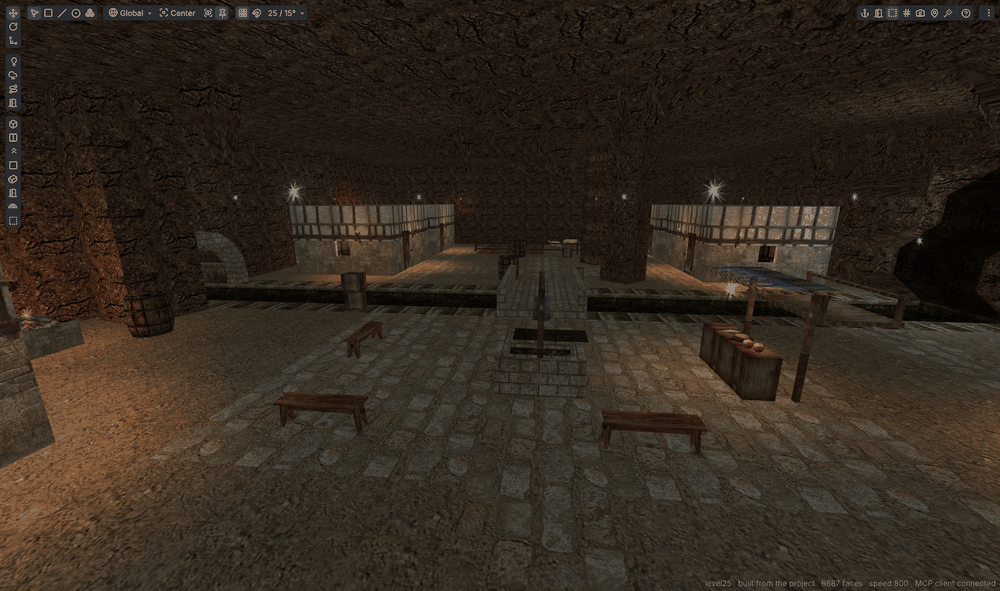
The townsfolk run the game's own ASL classes, set up per entity with override lines, as the game's levels do:
| Who | Overrides |
|---|---|
| Guards (three) | SET £type "human_guard_kingdom", SET £friend "kingdom", a BEHAVIOR |
| Villagers (seven) | £type "human_villager", female or child models, TWEAK lines for their looks |
| Chests | INVENTORY ADD lines for what is inside |
| Doors | SET §unlock 1 (unlocked) |
Where to look in the editor
- Scene view: fly with the right mouse button + WASD; F1 lists the keys (Levels).
- Outliner: everything by kind (NPCs, Items, Fixed, Lights, Portals...). Click one to select it.
- Inspector: the selection's values. For an entity: its ASL Init Values (overridden values in blue), Contents, Lua properties and Components (Entities).
- Problems: the level's checks. It should show no errors.
Try this
- Select a door in the Outliner (Fixed > light_door):
§unlockis blue, overridden. The arrow next to it reverts it. - Select the merchant behind the stall and read his override lines.
- Press # (view options) to colour the rooms: the cavern, the entrance tunnel and each house are rooms, joined by portals.
- Play and walk around: the townsfolk go about, the river and waterfall flow.
The quest: The Runaway Hen
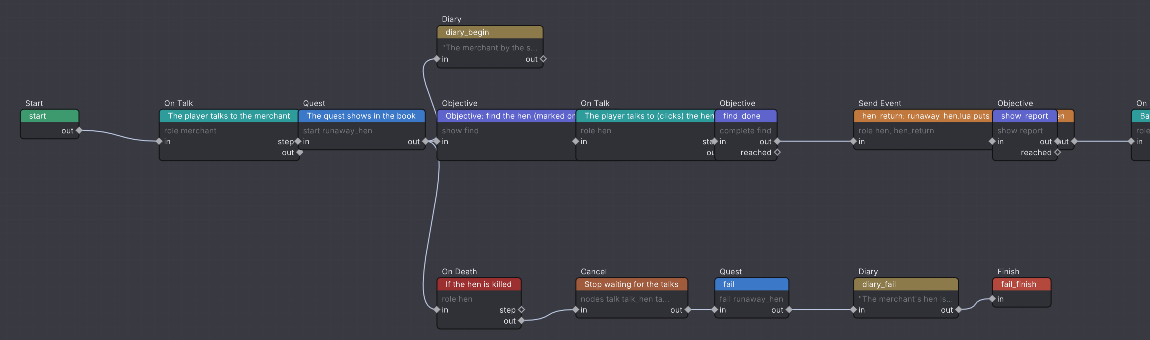
Talk to the merchant behind the market stall: one of his hens got out of the pen. Find her (she is marked on the map, on the river bank behind a house south-east of the stone bridge), talk to her (click her) and she goes back to the pen. Go back to the merchant for 25 gold coins and some XP. If the hen dies, the quest fails.
Where to look in the editor
- Assets > Quests > runaway_hen (double-click) opens the Quest tab (Quests).
- The graph: Start > On Talk (merchant) > Quest start > Objective "find" > On Talk (hen) > Send Event
hen_return> Objective "report" > On Talk (merchant) > Give Item, Add XP > Quest complete > Finish. - A second branch: On Death (hen) > Cancel (stops waiting for the talks) > Quest fail.
- Records: the title, description and two objectives the book shows. Map is ticked on both, so the target is marked.
- Variables: the roles
merchantandhen. Nodes and text name roles, not entities:{merchant}in the text. - The hen's side is a Lua component (below): the Send Event node calls its
on_quest_hen_return.
Try this
- Click a node: Details shows its settings.
- Play, then watch the tab: the active node glows green with its status (waiting: merchant chat). Talk to the merchant in the game and the wires flash.
- In the game, open the book: the quest is on the Active quests tab, and the map shows a gold marker on the hen.
A Lua class: the town well
The well on the square holds a watering_place: the game's invisible hotspot over water. The project's watering_place.lua replaces the game's script for that class, everywhere the project is played. It first does what the game's script did (fills an empty bottle, flour + water = dough, a green potion spoils the water, a drink), then adds:
| What | How |
|---|---|
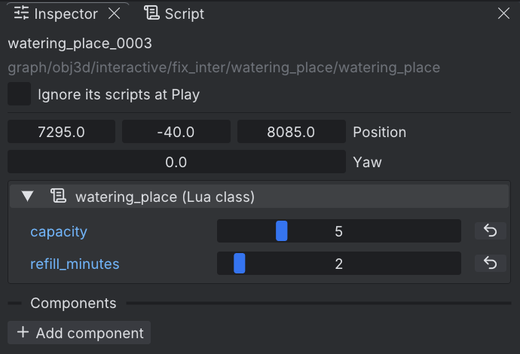
| Two properties | capacity (5 here: bottles before it runs dry; 0, the default, never runs dry) and refill_minutes (2 here) |
| Saved state | self.left, the water left. A field of self is saved with the game |
| A timer | every(...) gives back a bottle's worth of water every refill_minutes |
| Messages | Strings.town_well_hint and town_well_dry, from the project's localisation/ file |
Where to look in the editor
- Select the well's entity (Outliner: Fixed > watering_place). The Inspector shows the watering_place (Lua class) box with
capacityandrefill_minutesin blue (changed from the default). - The script:
assets/graph/obj3d/interactive/fix_inter/watering_place/watering_place.lua. Open it in your script editor (Edit > Preferences > Script editor, see Scripting).
Try this
- Play. Drag an empty bottle from the inventory onto the well to fill it; after five it says it is dry. Wait two minutes for more.
- Use the well with nothing in hand: a drink and a message.
- Set
capacityto 0 in the Inspector: it never runs dry, as in the game. (Ctrl+Z puts it back.)
These are only seen in the game, not in the Scene view.
Lua components: the town bell and its listeners
A component is a script added to one entity, next to its class. Three scripts in assets/scripts/ show how:
| Script | On | What it does |
|---|---|---|
town_bell.lua |
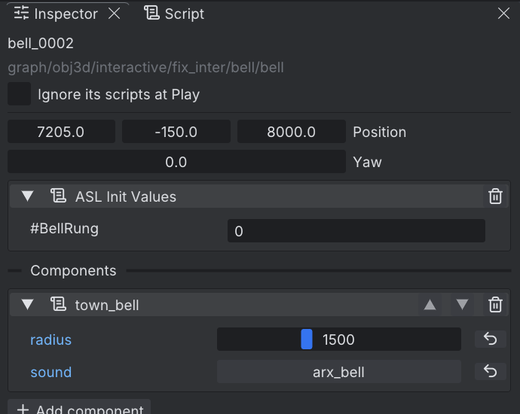
The bell under the well's beam | Using the bell swings it, plays its sound (arx_bell) and sends TownBell.rung to the NPCs within radius. It declares that event itself |
bell_listener.lua |
The three guards | on_rung: the guard turns toward the bell for look_seconds, then goes back |
runaway_hen.lua |
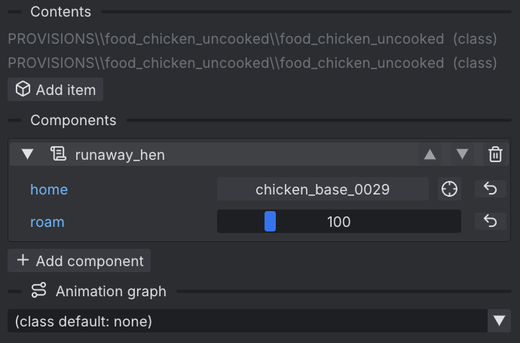
The runaway hen | Keeps her near where she stands (roam), clucks when talked to, and on the quest's hen_return goes back to her home (a pen chicken, picked in the Inspector) |
The bell and the guards never name each other: any NPC with an on_rung handler answers the bell; the others ignore it.
Where to look in the editor
- Select the bell (Fixed > bell), a guard, or the hen (NPCs > chicken_base, the one by the river): the Components section lists the component and its properties.
- Add component adds one to any entity; the arrows reorder them.
- Assets > New > Script... makes a new one in
assets/scripts/.
Try this
- Play, walk to the square and use the bell: the guards nearby turn to look at it.
- Raise the bell's
radius, play again: guards further away answer too. - Point the hen's
homeat another pen chicken with the pick button next to it.
An animation graph: the pig
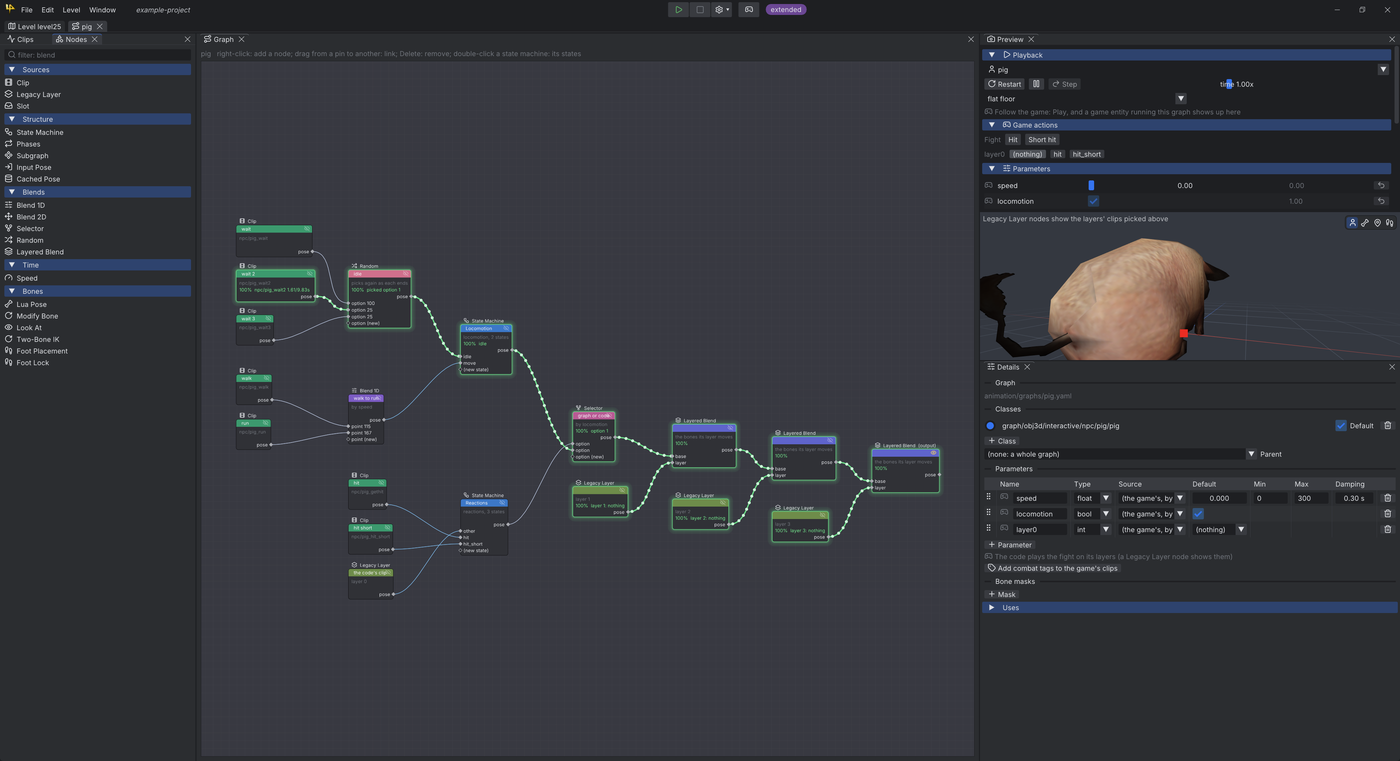
animation/graphs/pig.yaml runs for every pig: its Classes list has pig, Default ticked.
| Part | What it does |
|---|---|
locomotion state machine |
idle: a Random pick of the three pig_wait clips. move: a Blend 1D on speed, from pig_walk at 115 to pig_run at 167 (the clips' own speeds) |
reactions state machine |
pig_gethit or pig_hit_short when the game plays a hit (layer0==hit), else the game's own clip (Legacy Layer 0: death, script animations) |
Selector on locomotion |
Picks between the two machines |
| Layered Blends | Lay the game's layers 1-3 on top |
The pig class itself walks with the dog's dog_walk clip (the game's choice). With the graph, pigs use pig_walk.
Where to look in the editor
- Assets > Animation graphs > pig opens the Graph tab (Animation).
- Double-click a State Machine node to see its states and transitions.
- The Preview plays the graph on the pig model; Game actions > Hit tries a reaction.
Try this
- Drag the
speedparameter in the Preview: the pig goes from idle to walk to run. - Play: the tab shows each pig's live state (the active one green). Pick a pig in Follow to drive the Preview with it.
- Compare in the game: the pigs in the pen walk with their own clip, not the dog's.
types/: autocomplete for your script editor
The editor writes types/arx.lua there: the Lua API (every command, event, sound, class name...) as definitions for your script editor's autocomplete and checks.
- It is written at each Play while a script editor is chosen in Edit > Preferences > Script editor (VS Code, Rider or Custom).
- Until the first Play it is empty.
- See Scripting for the debugger setup.
Good to know
- Entity ids are
<class>_<number>. The game keeps an instance script for many numbers (bell_0001...), and an entity with that id would run it. That's why this project's bell and well have higher numbers.instances.yamllists the numbers in use, so new entities skip them. - Some things show only in the game: NPCs and animals moving, the full lighting (the Scene view is darker), the waterfall and water moving.