Quests
A quest is a graph of nodes plus records: what the player's book shows. The graph decides what happens; records show the progress.
Quests need the extended target.
Make a quest
- Assets > New > Quest..., or right-click the Quests folder > New quest....
- Give it an id (lowercase, digits,
_).
A new quest has one record and a Start node. It is saved in quests/<id>.yaml and opens in the Quest tab. Double-click a quest in Assets to open it again.
The Quest tab
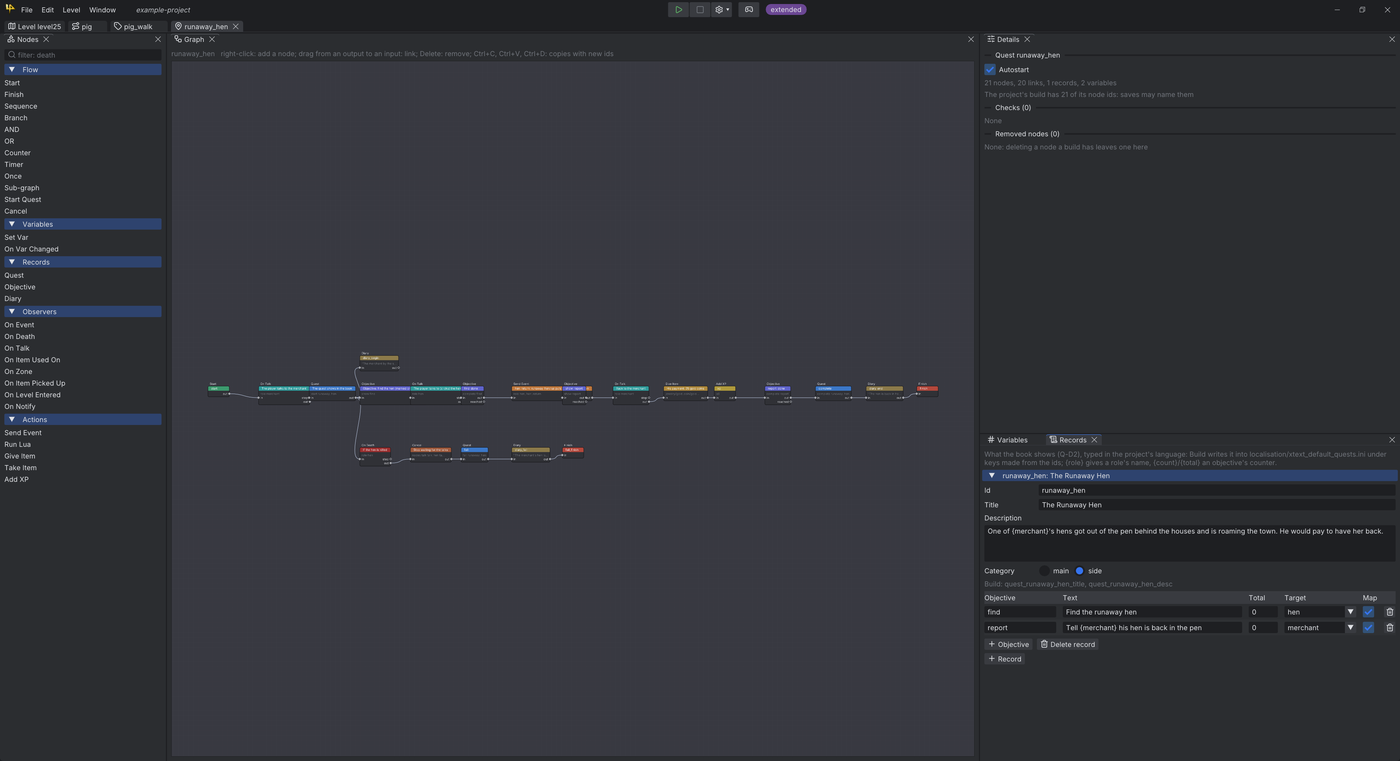
| Panel | What it does |
|---|---|
| Nodes | The node types by category. Drag one onto the graph, or double-click it |
| Graph | The nodes and their links |
| Details | The selected node's settings; with nothing selected, the quest's (Autostart, checks) |
| Records | What the book shows |
| Variables | The quest's variables and roles |
In the graph:
- Right-click the background to add a node. Drag from an output to an input to link.
- Drop a node onto a link to Splice in it.
- Del removes; Ctrl+C, Ctrl+V and Ctrl+D copy (copies get new ids).
- Every change is saved at once and is one undo step.
Nodes
| Category | Nodes |
|---|---|
| Flow | Start, Finish, Sequence, Branch, AND, OR, Counter, Timer, Once, Sub-graph, Start Quest, Cancel |
| Variables | Set Var, On Var Changed |
| Records | Quest (start, complete, fail a record), Objective (show, complete, fail, count), Diary |
| Observers | On Event, On Death, On Talk, On Item Used On, On Zone, On Item Picked Up, On Level Entered, On Notify |
| Actions | Send Event, Run Lua, Give Item, Take Item, Add XP |
- Observers wait for something in the game, then fire. Many count what is already true: an NPC already dead, an item already held.
- Signal mode per node: enabled, disabled (stops here), or pass through (fires its outputs at once).
- Hover a node type in the palette, or read Details, for its full help.
Tip
Once a quest is built, saved games may be waiting inside its nodes. Deleting such a node leaves a "removed node" entry that passes the saved signal on. Details lists them under Removed nodes.
Records and objectives
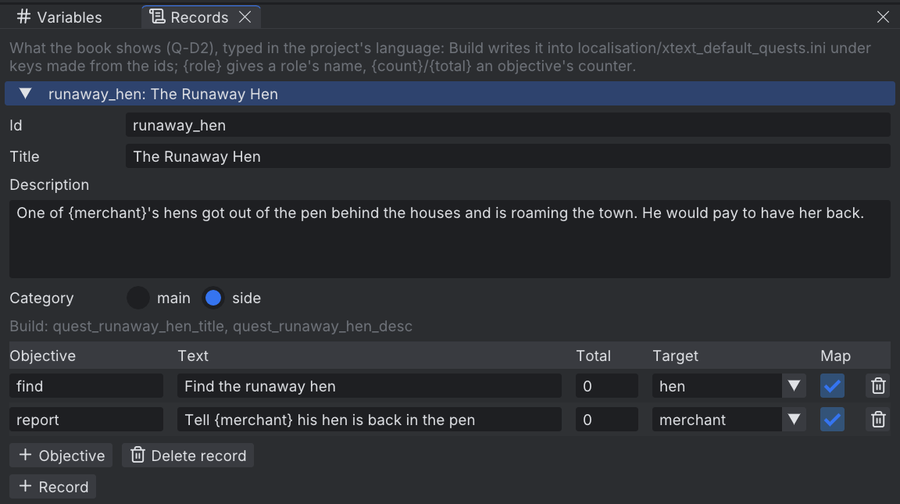
A record has a Title, a Description and a Category (main or side). Its objectives have:
| Field | Meaning |
|---|---|
| Text | The line in the book. {count}/{total} shows a counter |
| Total | A counter's end; 0 for none |
| Target | A role whose entity the map marks |
| Map | Show on map |
Build writes the texts into the project's localisation file.
In the game
- The book's quest page gets tabs: Journal (the classic diary), Active quests, Completed quests and Failed quests.
- An objective is shown open, ticked or crossed out.
- With Map ticked and a Target set, a gold diamond marks the target's entity on the book's map and the minimap, while the objective shows.
Variables and roles
- Variables: int, float, text, bool or entity. They live while the quest runs.
- Roles: entity variables filled when the quest starts, from a selector: an id, a class, a quest tag, a script group.
- Globals are written
#name,&nameor$namein node settings; ASL and Lua see them too. {name}in a text shows a role's name.
Starting a quest
- Autostart (Details, nothing selected): runs from New Game.
- Otherwise a Start Quest node, Lua
quest.start, or ASLQUESTSTARTstarts it.
Live debugging
While Play runs, the Quest tab shows the game.
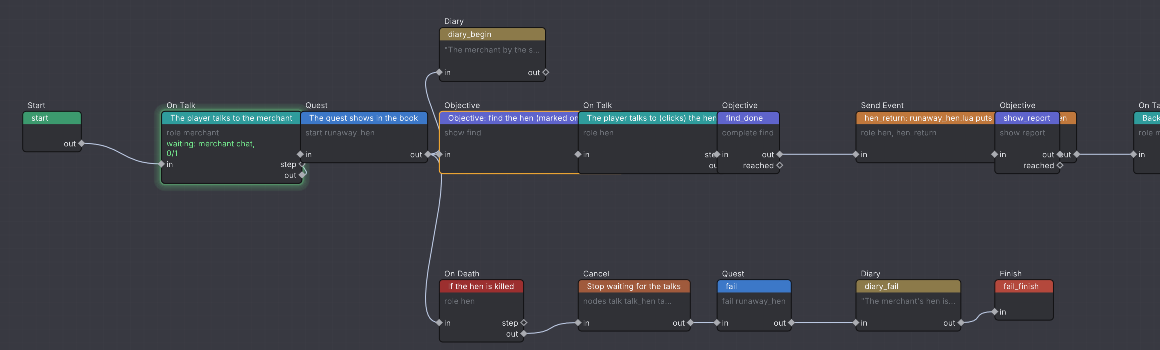
- Active nodes glow green, with their status under them. Wires flash when they fire.
- Right-click an output > Fire now: what it leads to runs now.
- Right-click a node > Start here...: the game restarts the quest with that node active. Set variables, roles and records first in the dialog.
- The Records and Variables panels show the game's values. Change a record's state there and the game follows.
questdebug
The same commands exist in the game's script console, when the console is enabled:
| Command | Does |
|---|---|
questdebug list |
Running quests and started records |
questdebug fire <quest> <node> <pin> |
Fires a node's pin |
questdebug state <record> <state> |
Sets a record: not_started, active, completed, failed |
questdebug objective <record> <objective> <state> [count] |
Sets an objective: hidden, shown, completed, failed |
questdebug start <quest> <node> [name=value ...] |
Starts the quest at a node |